Source, service, urgency
CONTROLLED LEAD WORKFLOW PREVIEW
Stop revenue leakage before good leads go cold.
The controlled Lead Lifecycle preview shows how enquiries can be captured, assigned, followed up, escalated and reported without relying on people to remember every next step.
Already have a CRM? Menixuz can improve and connect it rather than replace it, while working alongside your internal IT team.
Lead Lifecycle CRM
Every sample lead has a status, owner, and recovery path.
No risky auto-send
Overdue, recovered, won
Catch
A synthetic enquiry is loaded into one visible sample record.
Clarify
Sample intent, urgency, fit, and missing context are made visible.
Recover
The preview prepares simulated next-step options for review.
Approve
On-screen approval changes sample state only; it cannot contact a customer.
See
Operators can inspect sample stalled, recovered, and urgent leads.
lead recordLeadIntakeRoutingFollow-upApprovalOwner view
Where are your leads leaking?
Pick one business path and expose the pain before sharing contact details.
The result connects the visible symptom, likely cause, value at risk, evidence, and next safe recovery action to a working CRM board.
proposal follow-up
- Visible symptom
- proposal follow-up is visible as an overdue, unowned, blocked, or incomplete service inquiry record.
- Likely cause
- The lead has no enforced response deadline, recovery task, and owner-visible escalation.
- What Menixuz would change
- Assign the service inquiry, prepare the next domain-appropriate action, and keep it visible until reply, conversion, recovery, or a reasoned close.
- Evidence shown
- Lead source and received timestamp; Current stage, owner, and response deadline; Required domain fields and activity history.
Lead Lifecycle / simulated CRM
Interactive CRM preview from enquiry to outcome
Use sample records to change the business and market, inspect a blocker, move a lead through simulated approval, and record an outcome without contacting a customer or writing to an external system.
Preview onlyNo customer actionSession workspace
Response SLA15 minutesOwner approval is required before any simulated customer-facing WhatsApp, call, email, quote, or reminder.
1 leadsService inquiry
₹380,000SLA 15mSource, received time, request context, and first response SLA are visible.
1 leadsScope qualified
₹224,200SLA 15mRequired business fields, fit, urgency, owner, and missing details are checked.
1 leadsProposal prepared
₹277,400SLA 15mThe next safe reply, quote, callback, visit, or internal task is prepared.
1 leadsApproval
₹330,600SLA 15mA human owner reviews wording, policy, permission, price, or commitment.
1 leadsDelivery / renewal
₹383,8001 overdueThe approved booking, case, visit, delivery, job, or recovery path is being tracked.
1 leadsWon / lost
₹437,000SLA 15mThe outcome and reason are recorded for conversion, recovery, loss, and reporting.
Working CRM ready. CRM state stays inside this browser session; approved non-PII usage analytics may record safe route and action enums.
Where leads are leaking
Selected pain is diagnosed; other common agencies leaks stay visible.
proposal follow-up is visible as an overdue, unowned, blocked, or incomplete service inquiry record.
Assign the service inquiry, prepare the next domain-appropriate action, and keep it visible until reply, conversion, recovery, or a reasoned close.scope handoffs is visible as an overdue, unowned, blocked, or incomplete service inquiry record.
Assign the service inquiry, prepare the next domain-appropriate action, and keep it visible until reply, conversion, recovery, or a reasoned close.client approvals is visible as an overdue, unowned, blocked, or incomplete service inquiry record.
Put the draft and evidence into the owner queue, show the deadline, and approve or request changes inside the simulation.How the agents coordinate workDonald, Maya, Josh, Nira, Vani, Ivar, and Rose remain visible below the CRM

DonaldService inquiry / Scope qualified

MayaService inquiry / Scope qualified
JoshProposal prepared

NiraWon / lost

VaniProposal prepared / Delivery / renewal

IvarDelivery / renewal

RoseApproval
These simulated operating roles do not send customer messages, make calls, or write to an external CRM. Approved non-PII usage analytics may record safe route and action enums.
From sandbox to your operating process
Get this Lead CRM mapped for my business
Menixuz will review the agencies × INDIA route you configured. Target response time: the next business day.
Privacy boundaryThe form submits your contact details plus domain, market, scenario, current stage, and selected pain IDs. It does not submit the custom-business text, anonymized lead example, lead value, deadline, owner, audit trail, workspace ID, or any customer record. Those sandbox details remain in this browser session.
Ready to request a secure CRM mapping review.Open the request form to check delivery availability.
Book the existing scoping callPreview operating roles
The operating roles behind the sample lead workflow.
This preview visual shows how Donald, Maya, Josh, Nira, Vani, Ivar, and Rose could divide sample intake, routing, follow-up, review, and reporting roles without hiding the owner gate.
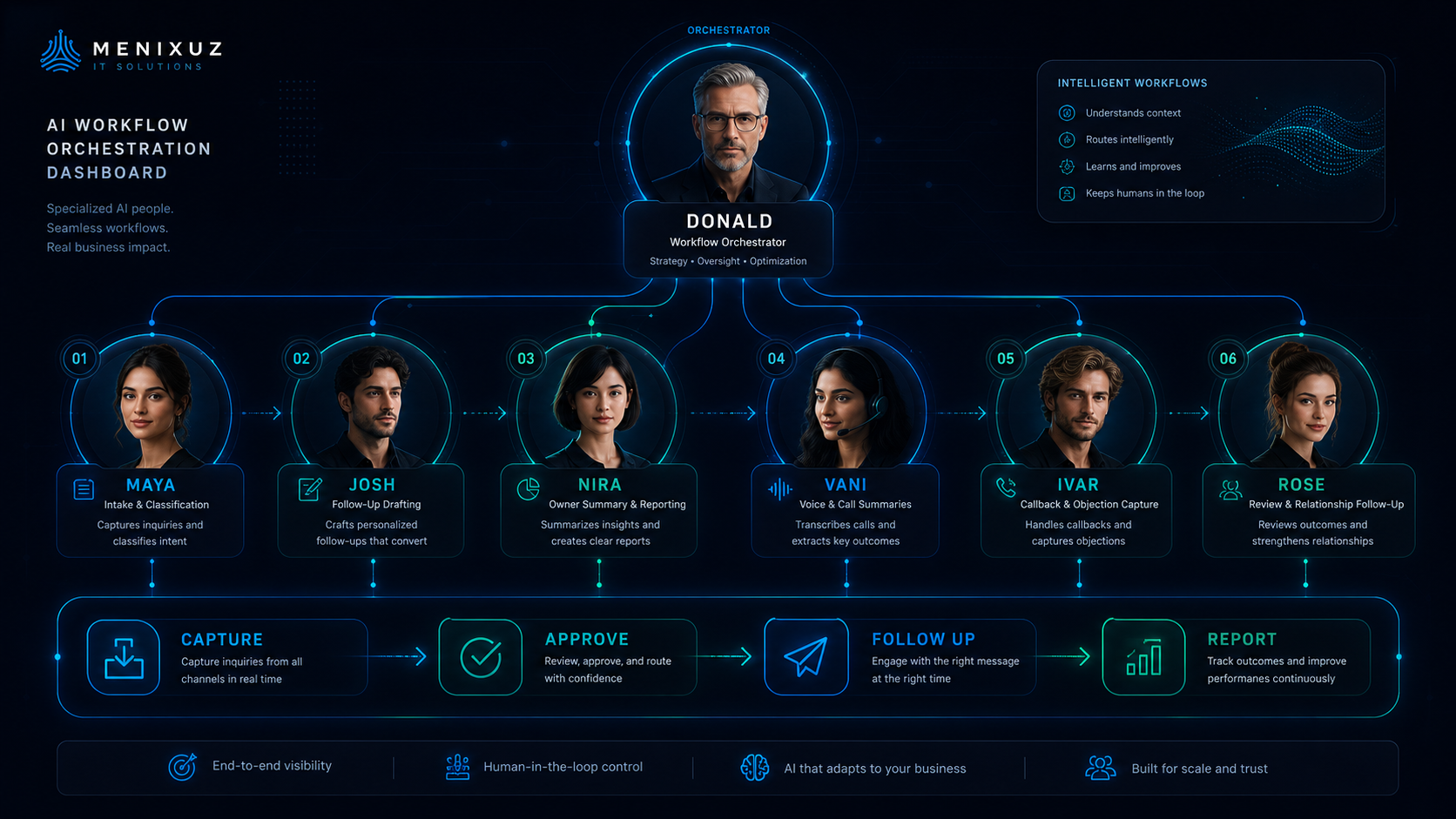
Preview operating roles only. They do not send customer-facing emails, WhatsApp messages, calls, or write to an external CRM. Approved non-PII usage analytics may record safe route and action enums.
Business presets
Start from the business type, then find the lead leak.
Events
Events and Venues
Turn every inquiry into a visible quote, follow-up, and booking workflow.
late quote follow-uplost WhatsApp threadsunclear next owner
Clinics
Clinics and Wellness
Capture appointments, answer common questions, and surface overdue callbacks.
missed appointment requestsunanswered common questionsno callback trail
Real Estate
Real Estate
Keep every property inquiry, visit, document, and follow-up visible.
site visit follow-updocument chasingstale leads
Recruitment
Recruitment and Staffing
Track candidates, client feedback, interviews, and document status in one lane.
candidate follow-upclient feedback gapsduplicate manual tracking
Hotels
Hotels and Stays
Recover booking inquiries and keep guest conversations from disappearing.
booking follow-uprate questionsguest request tracking
Restaurants
Restaurants and Hospitality
Route reservations, bulk orders, reviews, and repeat-customer follow-ups.
missed reservationsbulk order callbacksreview requests
Ecommerce
Ecommerce and D2C
Make customer questions, abandoned interest, returns, and reviews trackable.
support DMscart recoveryreturn follow-up
Agencies
Agencies and Professional Services
Turn inquiries, proposals, client tasks, and approvals into one operating view.
proposal follow-upscope handoffsclient approvals
Education
Education and Coaching
Track inquiries, trials, payments, class reminders, and learner follow-up.
trial class follow-uppayment remindersparent/student questions
Local Services
Home and Local Services
Keep job requests, quotes, schedules, technicians, and repeat follow-ups visible.
quote follow-upjob schedulingrepeat service reminders
Start with one lead-handling problem
Map the leak before connecting systems.
Bring one process that feels manual, fragmented, slow, or unreliable. Menixuz can map the workflow, identify the owner and controls, and decide whether the next step belongs in your current CRM or a separately scoped implementation.
Lead Lifecycle answers
The product in plain business language.
These answers explain what the product does for owners without turning the page into a technical blueprint.
What is Lead Lifecycle CRM?
Lead Lifecycle CRM is a controlled Menixuz preview for examining lead leakage. It uses synthetic records to model intake, identity context, routing, follow-up, recovery, approval, and owner reporting without connecting to live customer channels.
Which lead problems does it cover?
The sample scenarios model missed calls, no-shows, unopened quotes, unpaid invoices, missing documents, unconfirmed bookings, cold follow-ups, and overdue owner decisions. They demonstrate workflow structure rather than a live service.
How are India, USA, and Europe/UK lead routes different?
The illustrative India route puts WhatsApp, phone, and owner follow-up first. The USA route emphasizes email, LinkedIn, calendar, website-form, and CRM context. The Europe/UK route demonstrates where source, consent status, owner approval, and audit visibility would need to remain explicit.
Does the preview contact customers?
The public preview uses sample data and simulated actions. It does not ingest live enquiries, send email or WhatsApp messages, make calls, or write to an external CRM—even after an on-screen approval.
How fast do I need to respond to a new lead?
Set a response target that fits your market, staffing, customer expectations, and operating hours, then measure it against your own baseline. The preview can model due times and escalation paths with sample records, but it does not ingest enquiries or measure conversion results.
How much does lead automation cost?
A production implementation would be scoped around the workflow, integrations, data, controls, and edge cases. Menixuz does not quote a universal price or promise ROI before understanding the current process and its baseline.
Does automated follow-up actually work, or does it feel robotic?
The preview lets an operator inspect how sample context, drafting, approval, and exception handling could fit together. It does not contact customers or prove a conversion result. Any production message workflow would require separate integration, consent, testing, and approval controls.
Is this cheaper than hiring someone to chase leads?
That cannot be answered honestly without measuring the current workload, errors, delays, and opportunity cost. The intended role of automation is to reduce repetitive tracking and preparation while people retain judgment, relationships, exceptions, and accountability.
How do I get started with lead automation?
Start by describing the process and leakage points without entering real customer, contact, or sensitive data into this public preview. Menixuz can then determine whether a separately scoped implementation should improve an existing CRM, connect systems, or build a bounded workflow.
Is this a live, customer-ready CRM?
No. This public surface is a controlled synthetic preview. It demonstrates workflow states, sample records, on-screen approvals, and reporting concepts, but has no live enquiry ingestion, messaging, calling, or external CRM write capability.
We already have a CRM and internal IT. Is this still relevant?
Potentially. Menixuz can improve and connect an existing CRM rather than replace it, while working alongside internal IT on a narrowly bounded workflow. Your team retains business, architecture, security, and production authority; any implementation is separately scoped.